Vấn đề ban đầu apt update bị treo do không phân giải được DNS, cụ thể là các host như deb.debian.org và download.docker.com.
Các bước đã thực hiện Bước 1 - Cấu hình DNS tạm để có thể kết nối internet # Xóa symlink hỏng (nếu có) rm -f /etc/resolv.conf # Gán DNS tạm thời trực tiếp vào file (có hỗ trợ IPv6) cat > /etc/resolv.conf << 'EOF' nameserver 8.
Bài viết này hướng dẫn dựng stack gồm CLIProxyAPI và CPA-Manager (seakee) theo mô hình:
CLIProxyAPI: proxy server chính, expose API tương thích OpenAI/Claude/Gemini, chạy ở port 8317. CPA-Manager: WebUI quản lý + Usage Service, kết nối vào CLIProxyAPI, chạy ở port 18317. Bước 1 - Tạo cấu trúc thư mục mkdir cpa-stack && cd cpa-stack mkdir -p config auths logs Bước 2 - Tạo config.yaml cho CLIProxyAPI Nếu có file mẫu:
Bài viết này ghi lại cách dùng cliproxyapi để kiểm tra model và cấu hình vào OpenClaw.
1. Kiểm tra danh sách model từ endpoint Chạy lệnh với localhost:
curl -s http://localhost:8317/v1/models \ -H "Authorization: Bearer sk-49f89ead73fd2de416452597aaeb0fc2c633c81c77a8a9bdf1aa3b7615adb428" Chạy lệnh với IP trong mạng LAN:
curl -s http://10.10.38.1:8317/v1/models \ -H "Authorization: Bearer sk-49f89ead73fd2de416452597aaeb0fc2c633c81c77a8a9bdf1aa3b7615adb428" Nếu endpoint hoạt động đúng, bạn sẽ nhận được JSON chứa danh sách các model khả dụng.
Hướng dẫn cài đặt Lazygit trên Linux Lazygit là một công cụ mã nguồn mở giúp quản lý Git nhanh chóng và trực quan hơn ngay trên Terminal. Nếu bạn cảm thấy việc gõ git add, git commit hay git log quá tốn thời gian, Lazygit chính là giải pháp “cứu cánh”.
Các bước cài đặt bằng dòng lệnh Bạn có thể thực hiện cài đặt phiên bản mới nhất thông qua các bước sau:
Hướng dẫn cài đặt và cấu hình Opencode trên Debian 12 Opencode là một công cụ hỗ trợ lập trình tích hợp AI mạnh mẽ hoạt động trên giao diện dòng lệnh (CLI). Bài viết này sẽ hướng dẫn bạn chi tiết các bước để tải, cài đặt phiên bản glibc của Opencode trên Debian 12, cũng như cách thiết lập cấu hình để sử dụng với một Provider và Model AI tùy chỉnh.
Để cài đặt Helix editor bằng file prebuilt trên Debian 12, cần làm theo hai việc chính: cài đặt file thực thi (hx) và thiết lập thư mục runtime (rất quan trọng vì nó chứa cấu hình màu sắc, theme và tree-sitter cho syntax highlighting). Mặc định hướng dẫn này dành cho kiến trúc máy tính phổ biến là x86_64 (nếu bạn dùng ARM như Raspberry Pi, hãy đổi x86_64 thành aarch64).
Cài Yazi trên Debian 12 (Bookworm) bằng musl binary dựng sẵn Debian 12 đi kèm GLIBC 2.36, vì vậy bạn phải dùng bản build musl (liên kết tĩnh, không phụ thuộc glibc).
# 1. Tải binary musl dựng sẵn curl -Lo yazi.zip https://github.com/sxyazi/yazi/releases/latest/download/yazi-x86_64-unknown-linux-musl.zip # 2. Giải nén bằng busybox (không cần unzip) busybox unzip yazi.zip # 3. Cài binary mv yazi-x86_64-unknown-linux-musl/yazi /usr/local/bin/ mv yazi-x86_64-unknown-linux-musl/ya /usr/local/bin/ # 4. Kiểm tra yazi --version Điểm quan trọng: - Dùng yazi-x86_64-unknown-linux-musl.
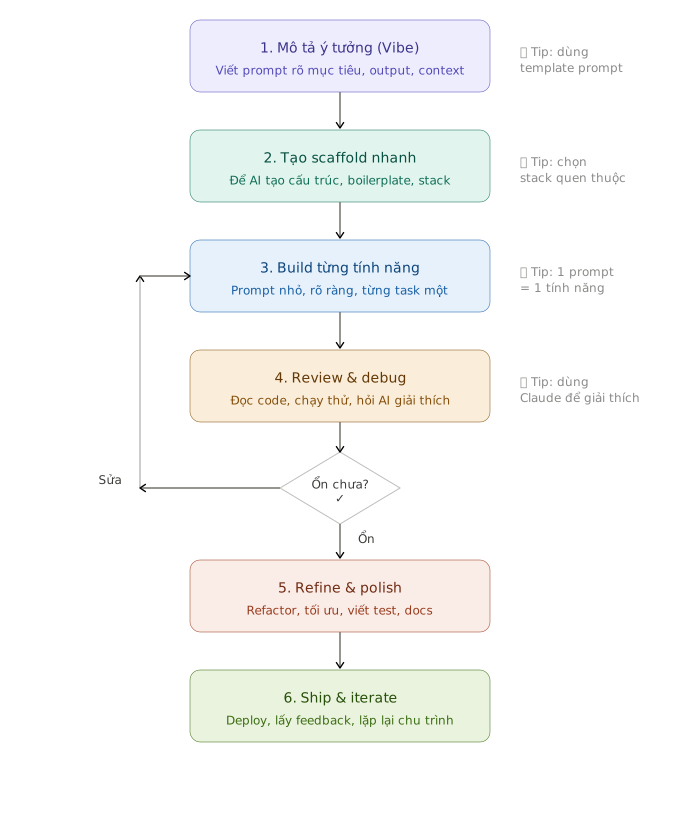
Đây là workflow 6 bước cho vibe coding hiệu quả.
Giải thích nhanh từng bước 1. Mô tả ý tưởng (Vibe) — Đừng vội code, hãy dành thời gian viết prompt rõ ràng: bạn muốn làm gì, output trông như thế nào, tech stack gì, ai sẽ dùng. Prompt mờ = code rác.
2. Tạo scaffold nhanh — Để AI lo phần xương sườn: cấu trúc thư mục, cài dependencies, setup routing/state.